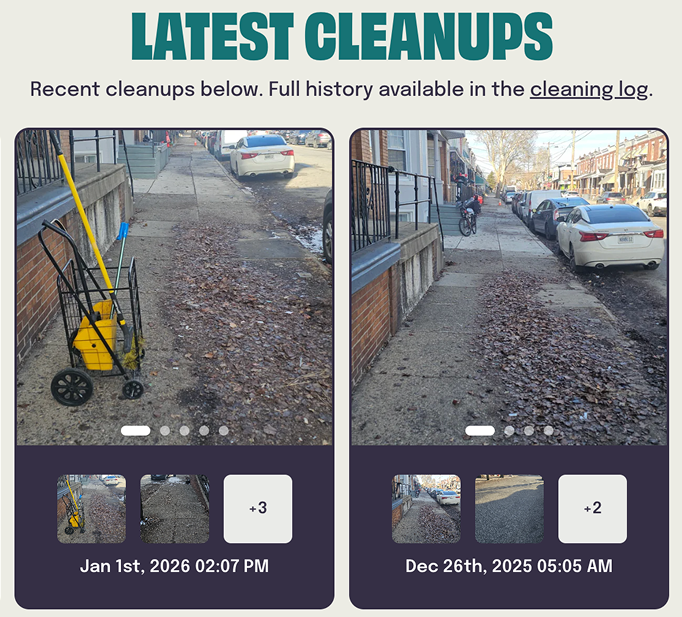
Glitter

A web app member hub for user and city block data for real-time insights and customer interaction, dynamically powered by a single source of truth database.

Role

Product Manager

Timeline

April 2024 – September 2025

Team

Product Manager/Designer, CEO, Founder

Glitter is a social impact cleaning service based in Philadelphia. They facilitate neighbor-funded cleanups for their city blocks, hiring and paying a living wage to cleaners who often have barriers to work. This case study provides an in depth overview of the end-to-end process of designing the web app, from the foundational data system to the design and launch of the member hub.

Although presented in a linear format, the actual process unfolded alongside two large-scale cleaning program launches. Balancing those operational priorities meant the timeline was anything but straightforward, but it reflects the iterative and adaptive approach required to bring the Member Hub to life.

Key Outcomes

  • Launched a dynamic, on-brand member hub that surfaces real-time, city block-level information, improving visibility, trust, and engagement across the platform

  • Created a centralized data foundation spanning across 1,000+ users and city blocks

  • Streamlined subscriptions and eliminated multi step manual workflows

  • Built scalable foundation for future core business and grant-funded initiatives

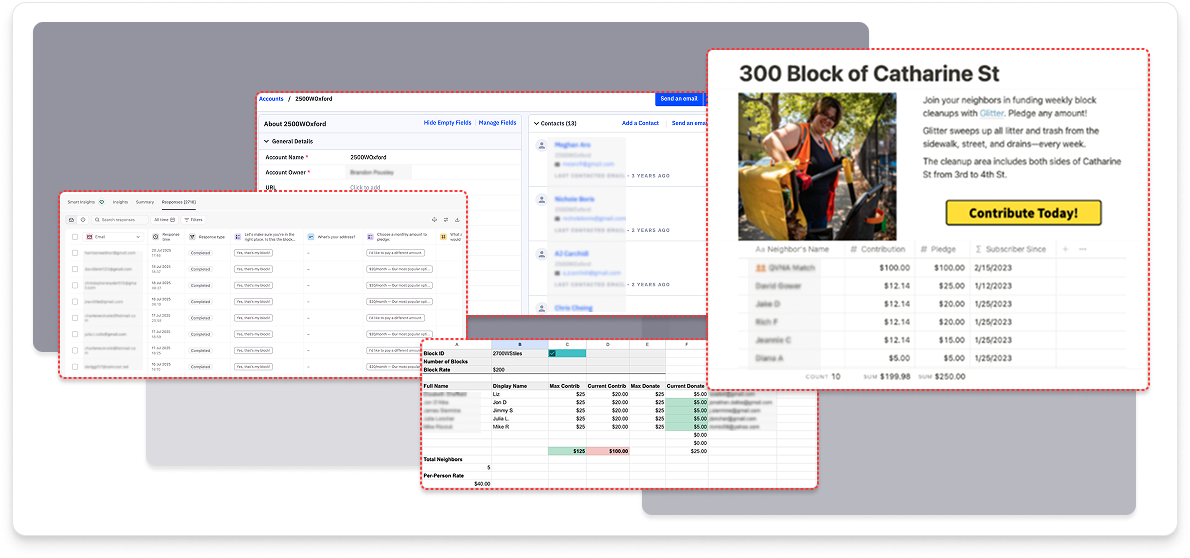
Before: fragmented workflows across multiple platforms

Data Context

Addressing sytems design and data architecure

Glitter knew the final deliverable from the outset: an informative member hub where neighbors can view their block and see real-time data and the results of cleaning efforts. But delivering a meaningful member hub required more than frontend UI considerations. Solving this systems and scalability challenge meant establishing a solid data foundation first.

The Problem

  • Data and workflows fragmented across Google Suite, Notion, Typeform, and Active Campaign

  • Static pledge pages for each city block required manual updates, import/export of data, and custom builds for each block

  • No real-time visibility into user subscriptions, funding, or block status

  • Scaling to 1,000+ city blocks was impossible with existing processes

Building the Single Source of Truth

The member hub's dynamic functionality would depend entirely on well-structured, relational data, previously lacking on siloed platforms and time consuming manual workflows. We also had to be mindful of scale— architecture had to work seamlessly on its own as well as connect with a low code UI platform that would host the web app.

Centralized Data System

Built comprehensive Airtable base to unify block, subscriber, payment, and billing data

Relational Logic

Designed data relationships to enable real-time updates and dynamic portal functionality

Automated Workflows

Created workflow automations and scripts for data population, funding redistribution, and cross-table updates

Real-time Dashboard Views

Developed billing and reporting dashboards for internal operations

Outcomes

  • Eliminated manual steps across multiple platforms

  • Reduced human error with validated data entry

  • Created the data backbone for web app member portal

  • Enabled real-time reporting and analytics

Data Systems Overview

Snapshot of the resulting Airtable base structure and relational logic.

Design Overview
Designing for Integration and Scale

How might Glitter design an accessible, on-brand experience for users that could be built on top of and in step with Airtable data? As a lean startup, Glitter needed a tool that was: cost effective without the need for custom development, could be managed entirely in-house, and provided an out of the box solution without a steep learning curve. After considering multiple options, Softr proved to be the best solution.

Design Strategy

Designing for an on Brand Experience

Glitter already had an established brand guide, created by Smith & Diction. Designing the web app required working within Softr’s native static and dynamic div block structures while incorporating custom elements such as Adobe Fonts. The goal was to deliver a seamless, cohesive brand experience across the web app.

Design Context, Part One: How It Started

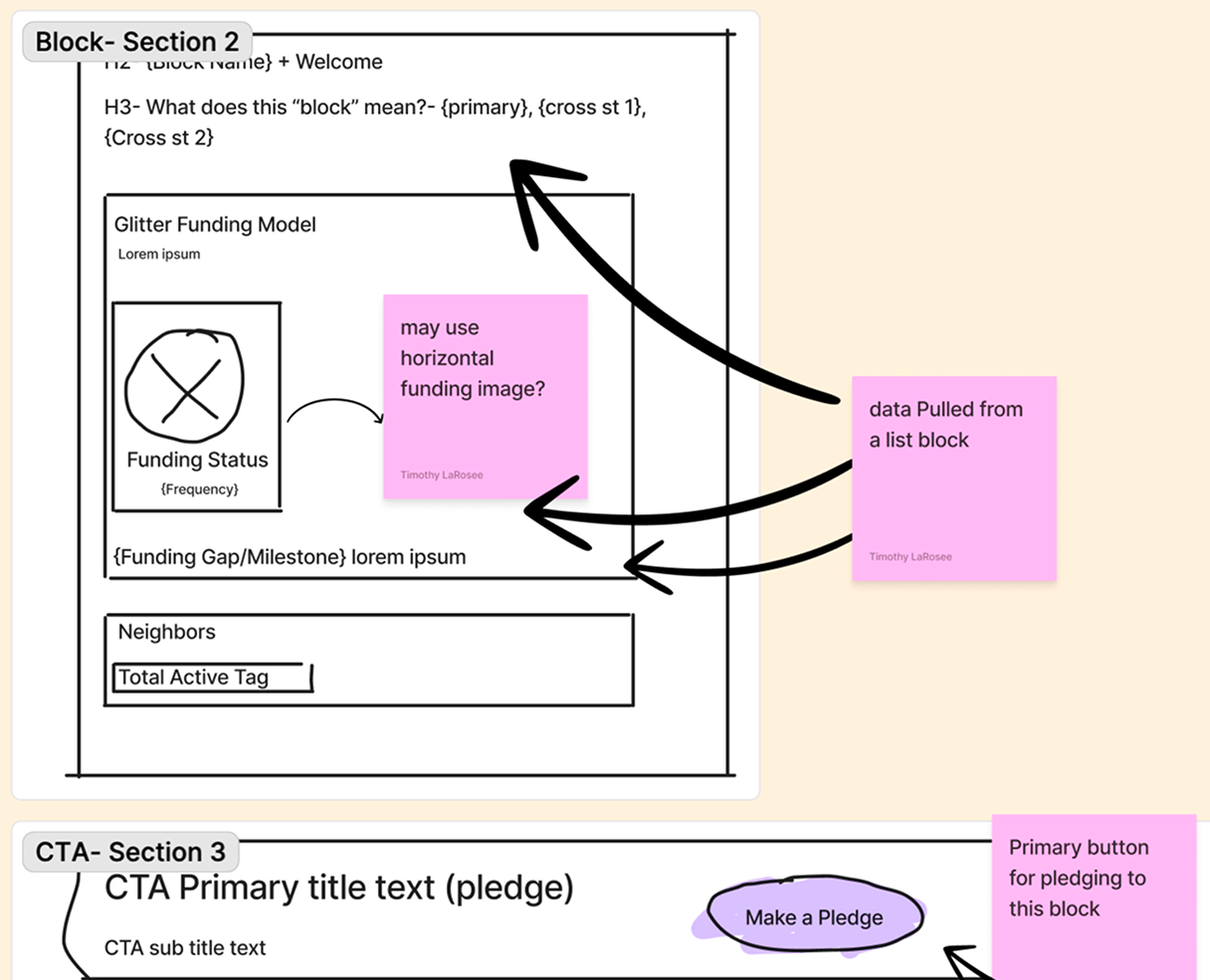
Early user flows and wireframes were intentionally loose, focused on defining structure, hierarchy, and critical data rather than refining UI. This gave us room to adapt once real platform constraints and trade-offs emerged inside Softr. Initial user interviews leveraged low-fidelity mockups to gather both high-level and detailed feedback, informing synthesis and guiding subsequent design iterations.

Design Transition: Partnering With A Third-Party Agency

As early design concepts were taking shape, Glitter was preparing to launch two large-scale grant-funded cleaning initiatives. My role expanded to oversee stakeholder engagement, operations and logistics planning, community outreach, and the integration of these projects into Airtable and, ultimately, the web app.

To maintain momentum while the product remained in a pre-MVP stage and ensure alignment with brand and technical needs, we partnered with a digital product agency to help bring the experience forward.

Collaborative Strategy

With the initial structure in place, Glitter and the agency aligned on a scope focused on developing new brand assets, refining UX and user flows, and translating wireframes into Softr’s dynamic and static components, including custom code where needed. The collaboration began with a comprehensive walkthrough of the business and the Softr editor to ground the work in platform realities. Regular design reviews were conducted both one-on-one and with leadership to ensure alignment as the work progressed.

Recalibrating Our Approach

It became clear that alignment across stakeholder vision, platform constraints, and practical realities was essential before further design work could continue. We paused, reassessed the direction, and ultimately made the decision to step back and recalibrate our approach.

Design Context, Part two: back to the drawing board

With clearer alignment and renewed focus, we returned to the core structure, iterating on what was working, refining what wasn’t, and rebuilding directly within Softr. This phase emphasized thoughtful execution, deeper customization, and a tighter connection between data architecture, brand, and user experience.

Where previously delivered assets fell short of expectations, we leveraged AI-assisted tools to generate adaptable visual components that, while not identical to the original Smith & Diction brand work, provided a cohesive and flexible extension of the identity within the web app. Additional refinement came through implementing targeted custom code, including window record lookups, to ensure dynamic data was pulled accurately and updates required minimal manual intervention.

High-fidelity design in the Softr editor

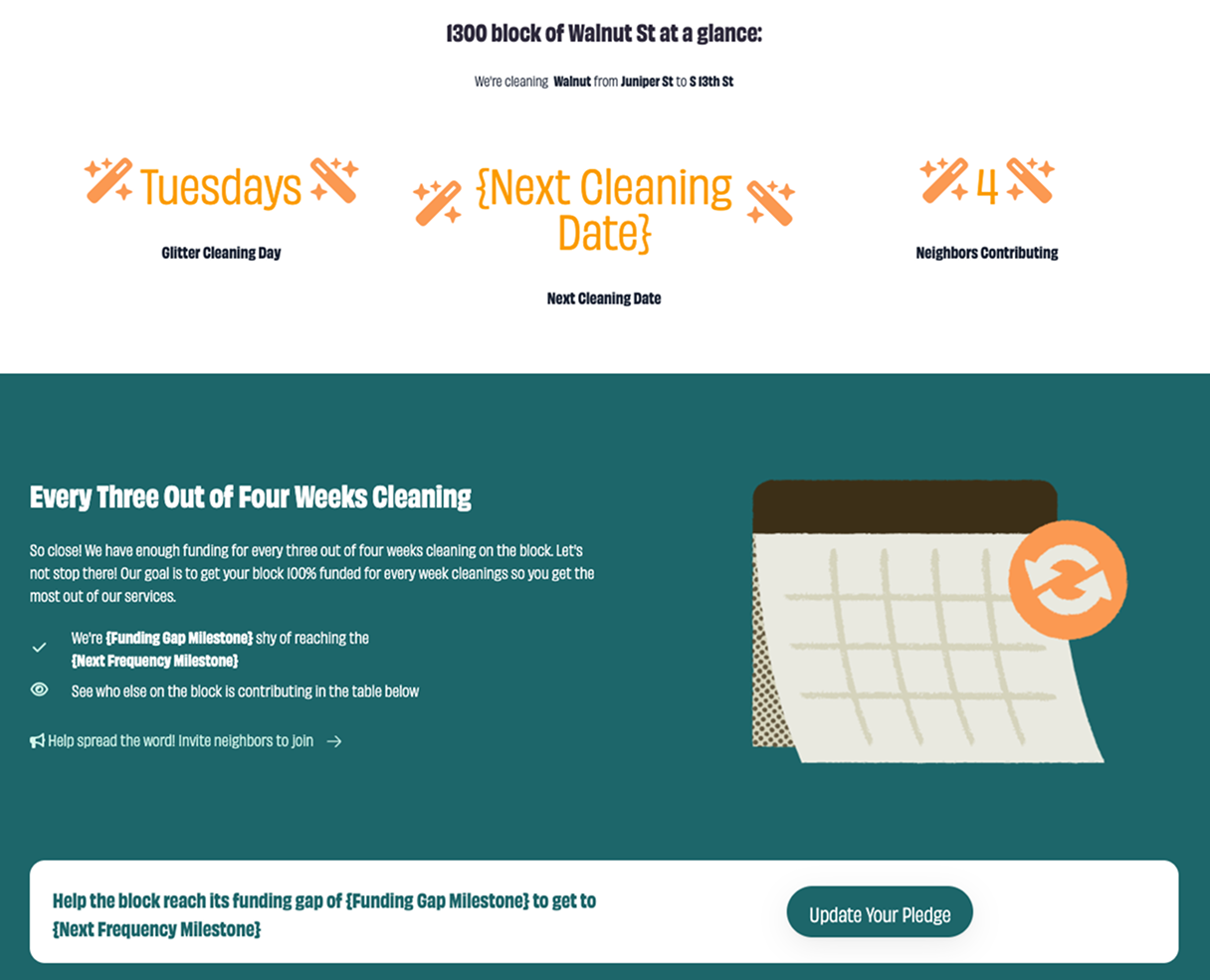
Designed polished dynamic and static templatized mockups that would scale to 1,000+ city blocks in Glitter’s database

Advanced Customization

Extended Softr's out-of-the-box capabilities with custom HTML/CSS and window.record lookups

Key Feature: Dynamic page templates

How Might we build trust and increase visibility while streamlining onboarding for new city blocks and users?

Previously, Glitter relied on a manual, time-consuming workflow that made scaling difficult. Each new city block or user required hand-creating fundraising pages, uploading images, and manually adjusting contribution amounts, slowing onboarding and limiting visibility for end users.

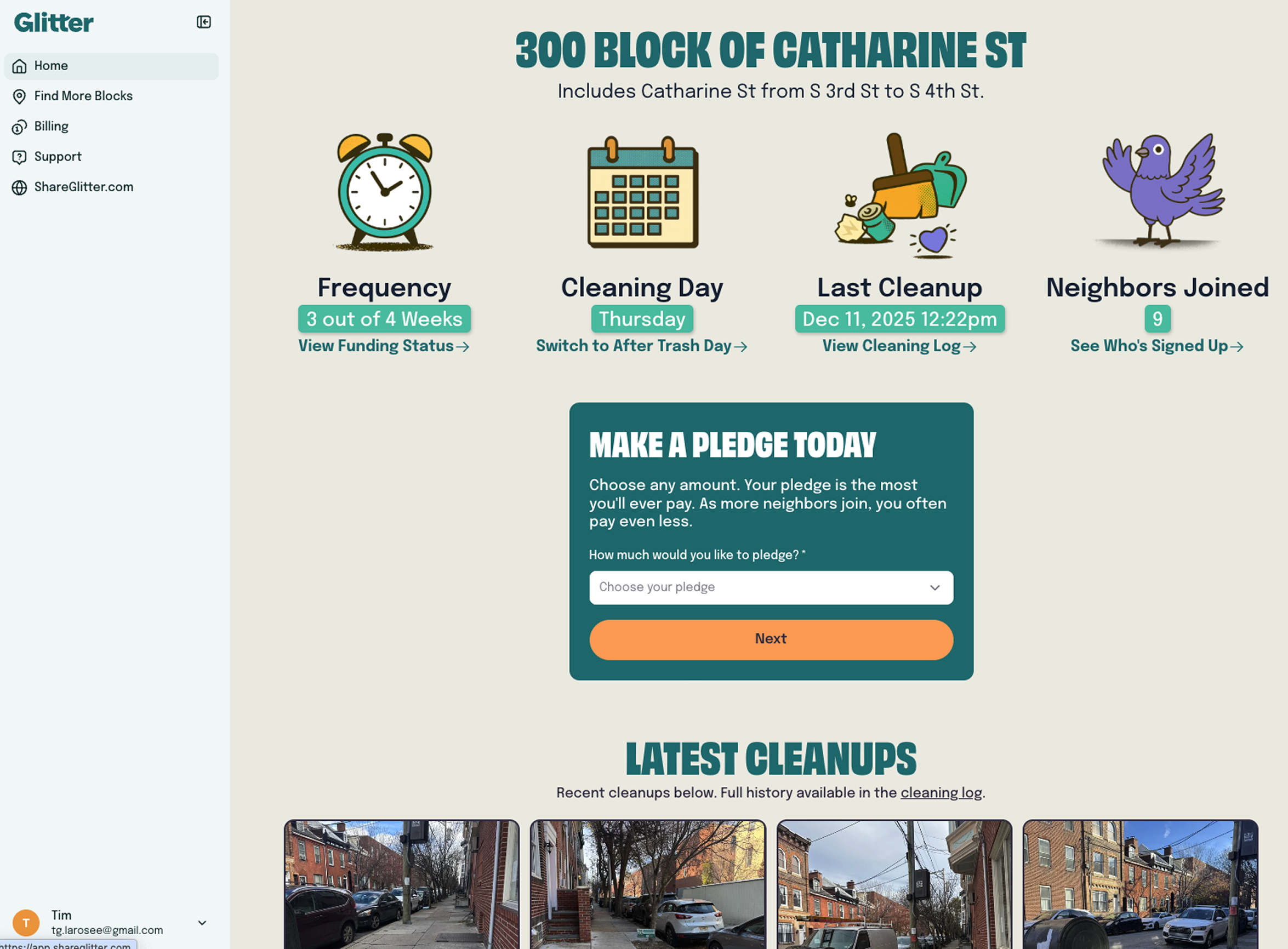
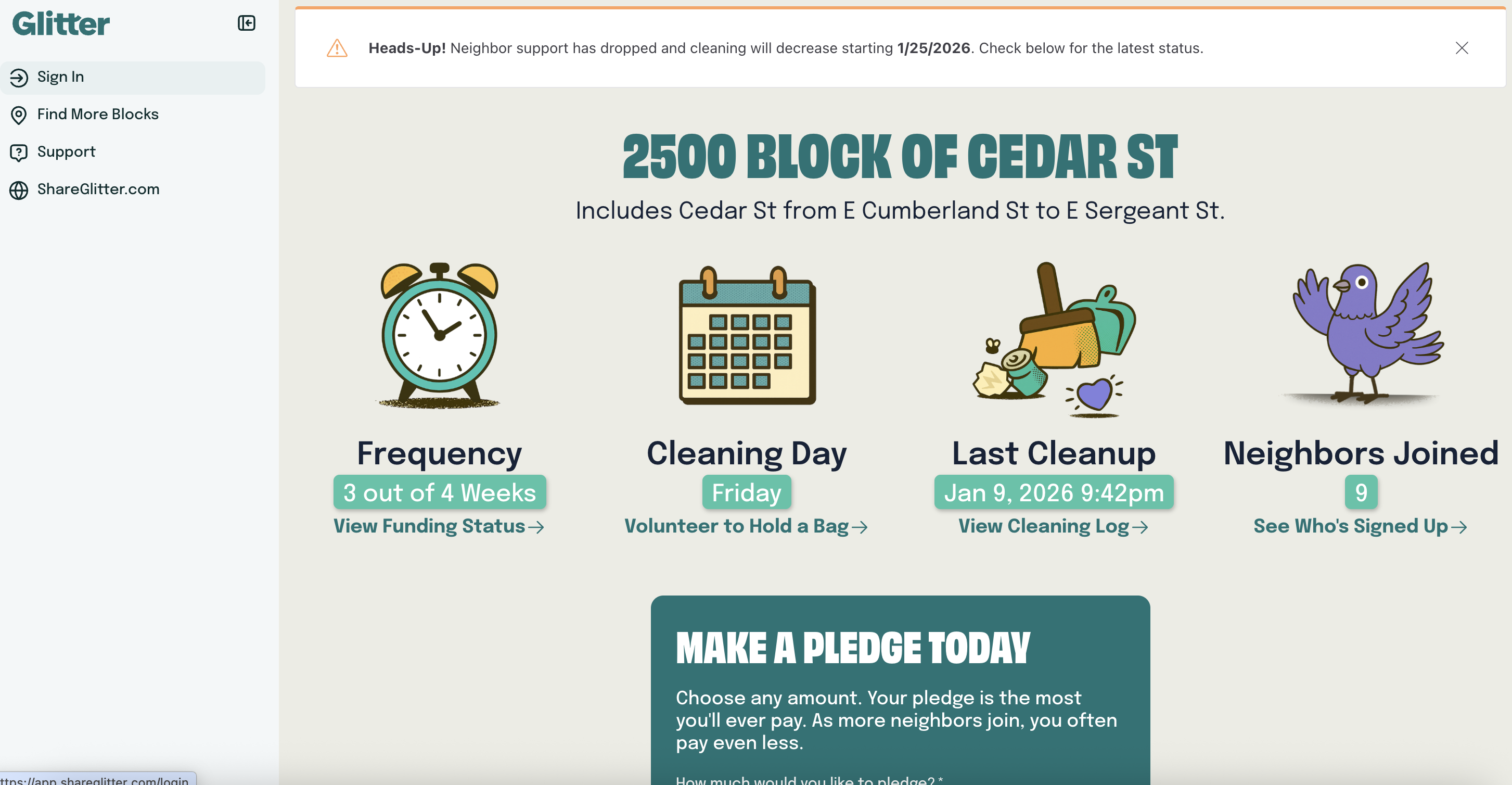
We designed scalable page templates that dynamically pull data across 1,000+ city blocks in Glitter's database, conditionally displaying block details, funding contributions, and cleaning status to improve transparency and accelerate onboarding.

Before: Static Pledge Pages

  • Manual updates required for each block, no real-time data

After: Dynamic Page Templates

  • Real-time data, conditional visibility, permission-based access

The public view of a city block’s page provides clear, block-specific details while introducing Glitter’s broader services, helping users easily imagine what the program could look like on their own block.

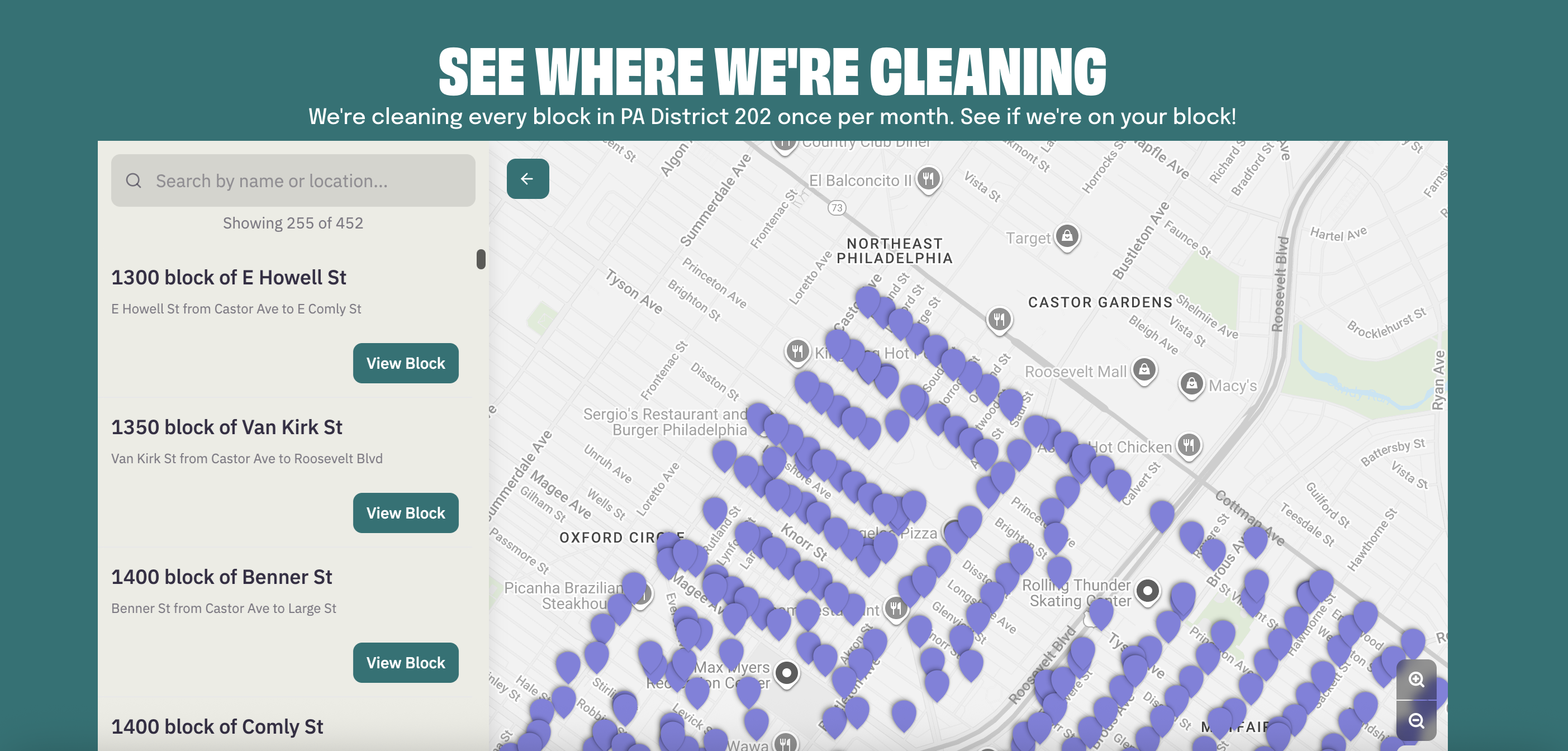
The page is accessible through multiple entry points, whether users arrive via the interactive map on Glitter's web page or by scanning a QR code on a street sign.
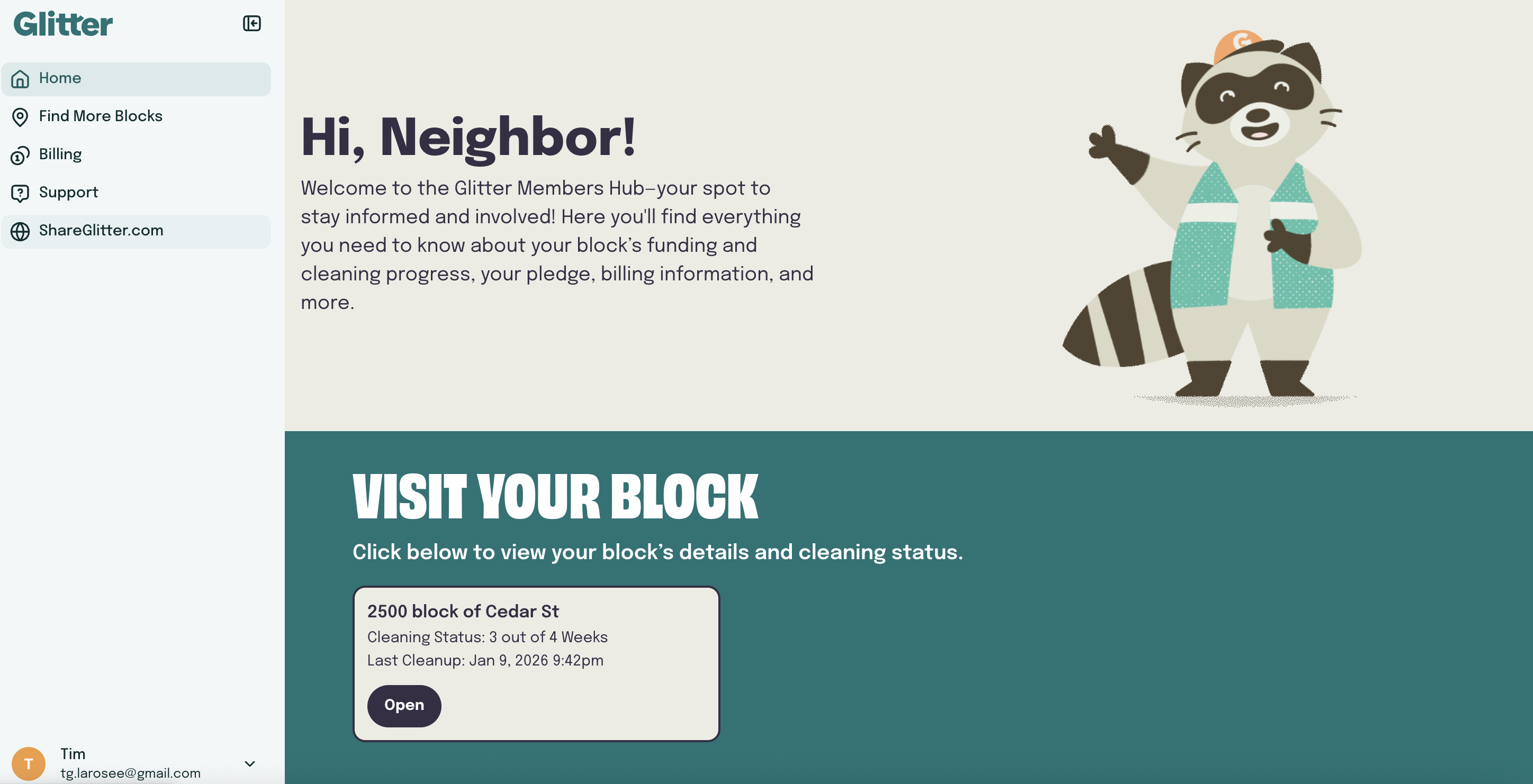
Once signed in, users are brought to a personalized dashboard that conditionally reflects their block association based on their account. Visual cues, like the waving raccoon mascot and block-specific UI cards, reinforce correct identification and give users clear access to detailed block information.
Grant-funded blocks are surfaced alongside neighbor-funded blocks through the same templated, conditionally driven system. By planning for their inclusion in the database, Glitter made large-scale grant-funded initiatives visible, allowing residents to opt in to additional pledges to support expanded cleaning.
Key Feature: Dynamic page templates

How Might we build trust and increase visibility while streamlining onboarding for new city blocks and users?

Previously, Glitter relied on a manual, time-consuming workflow that made scaling difficult. Each new city block or user required hand-creating fundraising pages, uploading images, and manually adjusting contribution amounts, slowing onboarding and limiting visibility for end users.

We designed scalable page templates that dynamically pull data across 1,000+ city blocks in Glitter's database, conditionally displaying block details, funding contributions, and cleaning status to improve transparency and accelerate onboarding.

Before: Static Pledge Pages

  • Manual updates required for each block, no real-time data

After: Dynamic Page Templates

  • Real-time data, conditional visibility, permission-based access

The public view of a city block’s page provides clear, block-specific details while introducing Glitter’s broader services, helping users easily imagine what the program could look like on their own block.

The page is accessible through multiple entry points, whether users arrive via the interactive map on Glitter's web page or by scanning a QR code on a street sign.
Once signed in, users are brought to a personalized dashboard that conditionally reflects their block association based on their account. Visual cues, like the waving raccoon mascot and block-specific UI cards, reinforce correct identification and give users clear access to detailed block information.
Grant-funded blocks are surfaced alongside neighbor-funded blocks through the same templated, conditionally driven system. By planning for their inclusion in the database, Glitter made large-scale grant-funded initiatives visible, allowing residents to opt in to additional pledges to support expanded cleaning.
Collaboration and Impact
Designing at scale required collaboration across teams, stakeholders, and users

This work was shaped through close collaboration with internal stakeholders, operations, and external stakeholder partners. Input from cleaners, user interviews, and the Softr team directly informed design decisions, ensuring the solution worked in real-world workflows, not just in theory.

Internal Stakeholder alligment

Partnered closely with leadership to align on vision, goals, and constraints. Through ongoing prioritization and trade-offs, design decisions balanced business needs with scalability and long-term maintainability.

User research and validation

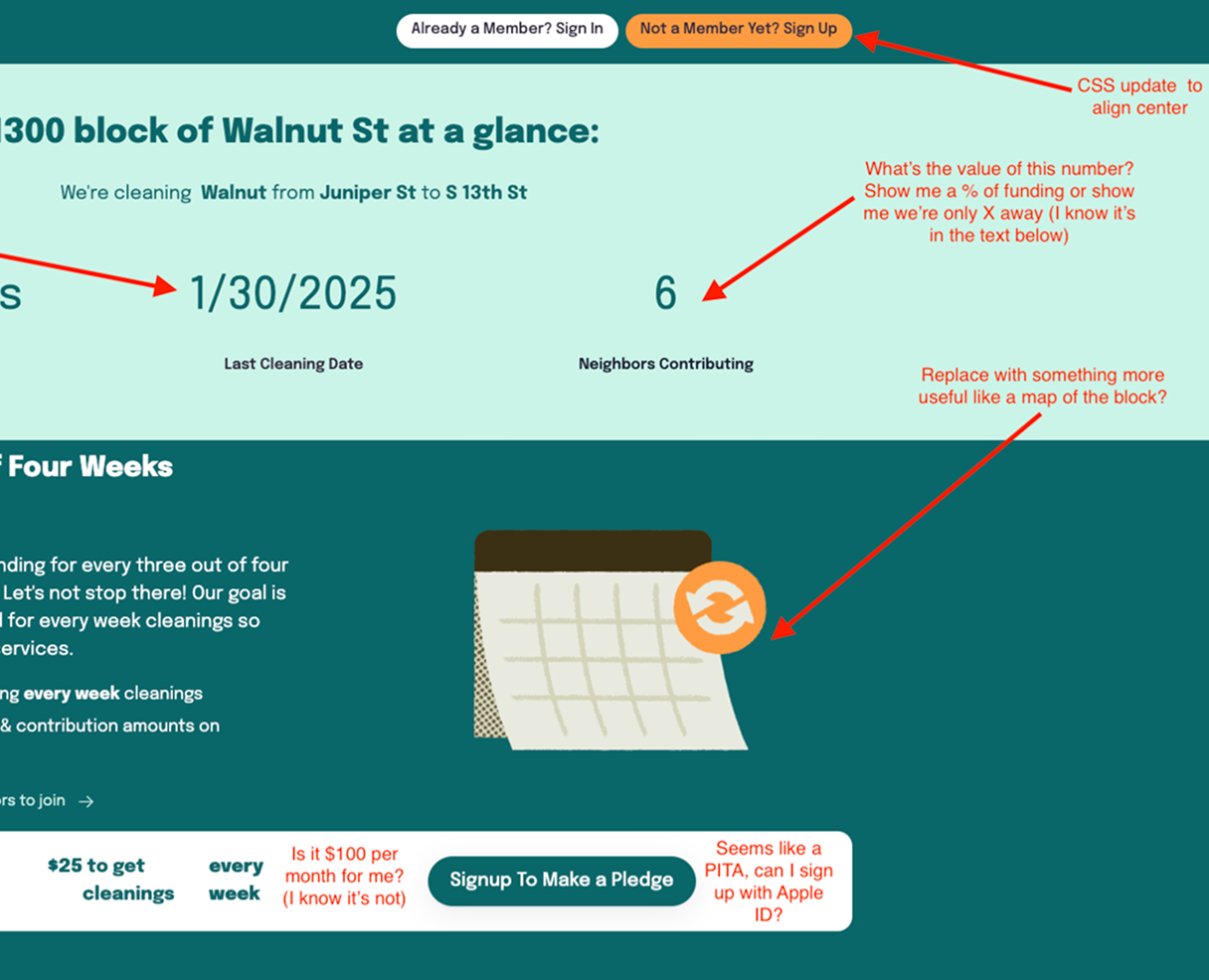
Facilitated user interviews with leadership and synthesized insights to surface trust signals, clarity gaps, and onboarding friction. Research findings and ongoing feedback informed product and design decisions, balancing user needs with technical and data constraints.

Operational and cleaner feedback

Collaborated with operations and cleaners to understand on-the-ground workflows and constraints. Their input surfaced edge cases and operational realities that directly shaped data visibility, content hierarchy, and system design.

Platform and partner collaboration

Worked directly with the Softr team to navigate platform constraints and capabilities. These discussions shaped implementation decisions around dynamic data, templates, and custom code integrations to ensure scalability and a consistent product experience.

With a little help from our freinds

It paid off to build a strong relationship with the Softr team that went beyond customer success and engineering and into marketing. Together, we shipped a product they were proud to showcase—resulting in Softr’s first in-person, video-documented customer case study for their customer story series.

Collaboration and Impact
Designing at scale required collaboration across teams, stakeholders, and users

This work was shaped through close collaboration with internal stakeholders, operations, and external stakeholder partners. Input from cleaners, user interviews, and the Softr team directly informed design decisions, ensuring the solution worked in real-world workflows, not just in theory.

Internal Stakeholder alligment

Partnered closely with leadership to align on vision, goals, and constraints. Through ongoing prioritization and trade-offs, design decisions balanced business needs with scalability and long-term maintainability.

Operational and cleaner feedback

Collaborated with operations and cleaners to understand on-the-ground workflows and constraints. Their input surfaced edge cases and operational realities that directly shaped data visibility, content hierarchy, and system design.

User research and validation

Facilitated user interviews with leadership and synthesized insights to surface trust signals, clarity gaps, and onboarding friction. Research findings and ongoing feedback informed product and design decisions, balancing user needs with technical and data constraints.

Platform and partner collaboration

Worked directly with the Softr team to navigate platform constraints and capabilities. These discussions shaped implementation decisions around dynamic data, templates, and custom code integrations to ensure scalability and a consistent product experience.

Putting a Lid on It (For Now)
Reflection and Learnings

Key takeaways from building at the intersection of design, data, and operations.

Next Steps

The foundation is in place. The opportunity now is refinement and scale.